
Templates
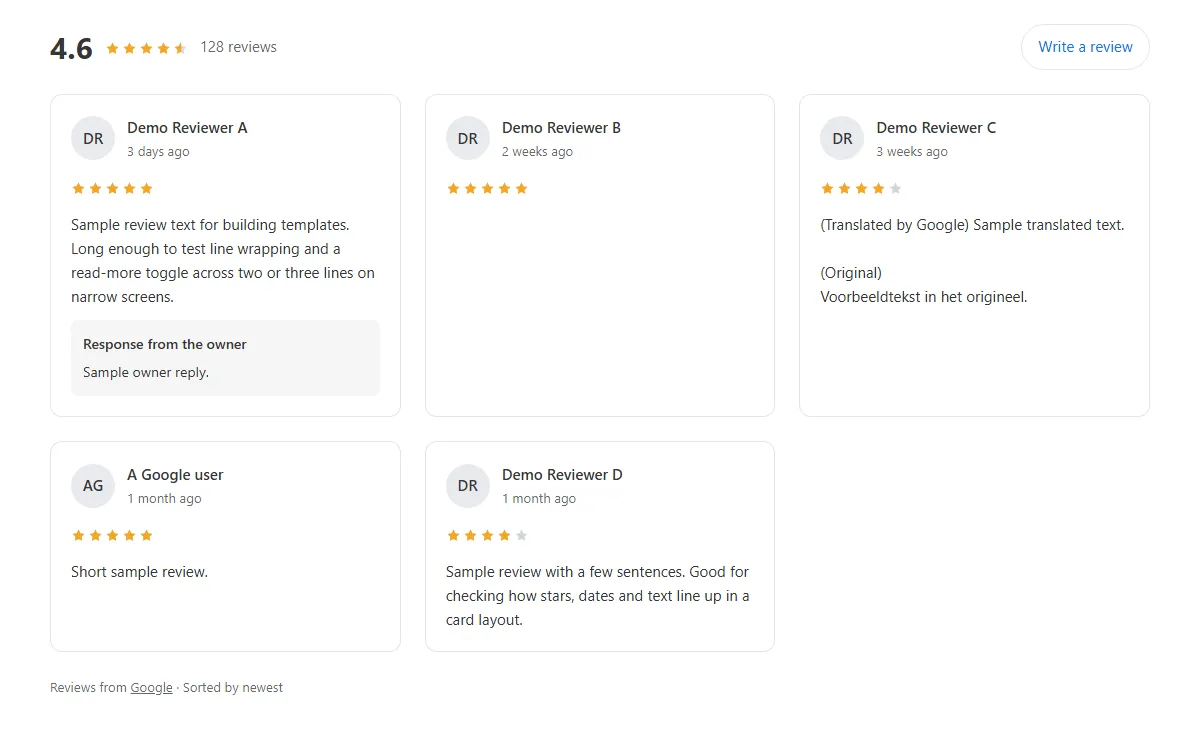
Telkaro comes with three starter designs, built entirely from the Telkaro elements. Use them as they are, restyle them, or take them apart to learn how a review layout is built.
| Template | What it shows |
|---|---|
| Telkaro: review cards | Header with average rating, stars, review count and a Write a review button; a grid of 6 review cards (3, 2 or 1 per row); Google attribution. |
| Telkaro: review carousel | The same header and attribution, with 9 reviews in a slider (3 per view, 2 on tablet, 1 on mobile; arrows and dots). |
| Telkaro: rating badge | A compact “Google reviews 4.6 ★★★★★ (128)” badge that links to your business on Google Maps. |
Adding the templates
Section titled “Adding the templates”- Go to Settings → Telkaro → Bricks templates. Each template shows a preview.
- Click Add templates to Bricks. They appear under Bricks → Templates in the category Telkaro.
- On any page, add Bricks’ Template element and choose a Telkaro template. Or open the template and copy its elements into your page to change them freely.
After adding, the tab shows a live preview with your own reviews and an Edit in Bricks link. Adding again never overwrites templates you changed; only missing ones are added.
Restyling with variables
Section titled “Restyling with variables”All styles sit on global classes in the category Telkaro (for example telkaro-reviews,
telkaro-review__name), never on element IDs. The top layer’s class holds CSS variables you can
change in one place: select the top element, open its class and edit the variables in CSS.
Review cards and carousel (class telkaro-reviews):
| Variable | Default | Controls |
|---|---|---|
--tk-text |
currentColor |
Text colour |
--tk-muted |
rgba(0, 0, 0, .6) |
Dates, counts, attribution |
--tk-accent |
#1a73e8 |
Links and the button |
--tk-star |
#f5a623 |
Star colour |
--tk-card-bg |
#fff |
Card background |
--tk-border |
rgba(0, 0, 0, .1) |
Card borders |
--tk-reply-bg |
rgba(0, 0, 0, .04) |
Owner reply background |
--tk-initials-bg |
#e8eaed |
Initials circle when there is no photo |
--tk-radius |
12px |
Corner radius |
--tk-card-padding |
20px |
Padding inside a card |
--tk-gap |
24px |
Space between cards and slides |
--tk-avatar-size |
44px |
Photo size |
--telkaro-clamp-lines |
6 |
Lines before “Read more” |
Rating badge (class telkaro-badge): --tk-text, --tk-muted, --tk-star, --tk-badge-bg
(#fff), --tk-border and --tk-radius (10px).
Keep the attribution
Section titled “Keep the attribution”The review templates end with the Google attribution element (“Reviews from Google · Sorted by newest”). Google requires it wherever reviews are shown; keep it when you change a template. See Google’s rules.